How to Choose a Robot Chassis: Material, Drive Type, and Size Guide

ContentsMaterial Options
The chassis is the part of a robot build that gets the least attention and causes the most regret. It's tempting to grab whatever chassis kit shows up first in a search and focus your energy on the "interesting" parts — sensors, code, AI — but a poorly chosen chassis can undermine all of that work: motors that don't fit cleanly, a frame that flexes under load, or a footprint too large for the space you actually want the robot to operate in.
Some articles include recommended robotics gear. We only suggest products we genuinely believe are useful.
This guide covers the practical decisions behind choosing (or designing) a chassis, before you commit to a build.
Material Options
Acrylic
Cut (usually laser-cut) acrylic chassis kits are extremely common in beginner kits — cheap, lightweight, and easy to mount components to using standard screws and standoffs.
Trade-offs: brittle (cracks under sudden stress or if dropped) and flexes noticeably under load, which can introduce wobble in precision applications like camera mounts or arm bases.
Aluminum
Aluminum chassis (often extruded aluminum or laser-cut aluminum sheet) offer a substantial jump in rigidity and durability over acrylic, at a moderate weight and cost increase.
Trade-offs: heavier than acrylic or 3D-printed plastic, and modifying it (drilling new holes, cutting new mounts) requires more tools than acrylic or printed alternatives.
3D-Printed Plastic (PLA/PETG)
A printed chassis (see our 3D printer buying guide) offers the most design flexibility — you can design mounts for your exact components rather than adapting your components to a generic kit.
Trade-offs: print time for larger chassis pieces can be substantial, and material strength varies significantly based on material choice and print settings (PETG generally outperforms PLA for structural chassis parts).
Carbon Fiber
For builders prioritizing a high stiffness-to-weight ratio (common in racing-style or weight-sensitive robots), carbon fiber plates offer excellent rigidity at low weight.
Trade-offs: significantly more expensive than the alternatives above, and harder to modify or repair if damaged.
Drive Type: How the Chassis Moves
The chassis material matters less than the drive configuration it's built around, since this fundamentally determines what your robot can and can't do.
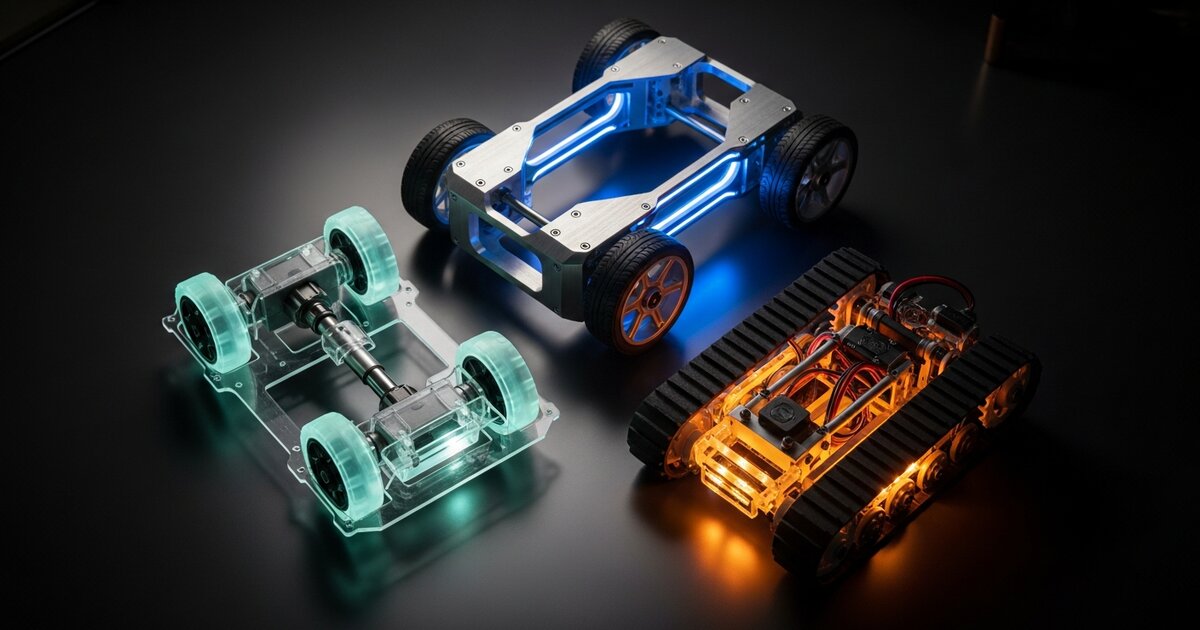
Two-Wheel Differential Drive (+ Caster)
The most common beginner configuration: two independently driven wheels plus a passive caster or ball wheel for balance. Steering is achieved by varying the relative speed of the two wheels (turn by slowing/reversing one side).
Best for: line followers, basic obstacle avoidance robots, most beginner builds.
Four-Wheel Drive
Adds two more driven wheels, typically still using differential steering (skid steering). Provides more traction and torque, useful on rougher surfaces or for carrying heavier loads, at the cost of more current draw and motor cost.
Best for: outdoor robots, heavier builds, rough terrain.
Omnidirectional (Mecanum or Omni Wheels)
Specialized wheel designs allow movement in any direction — including sideways — without needing to rotate the robot's body first. This adds real capability but at meaningfully higher cost and mechanical complexity.
Best for: warehouse-style robots, robots needing precise lateral movement in tight spaces, advanced projects.
Tracked Drive
Tank-style tracks instead of wheels, offering excellent traction on loose or uneven surfaces (sand, gravel, rubble) at the cost of higher friction (and therefore power draw) on smooth surfaces, and generally less precise turning than wheeled designs.
Best for: outdoor or rough-terrain robots, robots prioritizing traction over speed or efficiency.
Sizing Considerations
- Match the chassis to your motors and wheels first, not the other way around — it's much easier to find or design a chassis around components you've already chosen than to source components that happen to fit a chassis you bought first.
- Leave more room than you think you need. Beginners consistently underestimate how much space wiring, a battery pack, and a breadboard or PCB will take up once everything is actually installed.
- Consider your operating environment. A chassis sized for smooth indoor floors may struggle on carpet or outdoors; ground clearance matters more than most beginners initially assume.
Mounting and Modularity
A chassis with a grid of evenly spaced mounting holes (common on many aluminum and acrylic kits) makes it dramatically easier to reposition components as your design evolves, compared to a chassis with only a few fixed mounting points. If you're designing your own printed chassis, building in a similar grid pattern from the start saves significant redesign time later.
FAQ
Should beginners build their own chassis or buy a kit?
Buy a kit for your first build. Designing a chassis well requires understanding constraints (motor mounting, weight distribution, wiring routing) that are much easier to learn by using a proven design first, then designing your own once you understand what actually matters.
What chassis size is best for a first robot?
Small and simple — a compact two-wheel differential drive chassis is easier to debug, cheaper to build, and forces you to confront sensor and control problems without the added complexity of a larger, heavier platform.
Does chassis material affect sensor accuracy?
Indirectly, yes — a flexing chassis can shift sensor alignment slightly under load or vibration, which matters more for precision tasks (camera-based navigation, fine manipulation) than for basic obstacle avoidance.
Can I switch drive types on the same chassis later?
Sometimes, but it's often easier to plan for your target drive type from the start. Differential and four-wheel drive chassis are the most flexible to adapt; mecanum and tracked drives generally require purpose-built mounting points.
How much weight should I budget extra room for?
A reasonable rule of thumb is to size your chassis and motors for at least 30-50% more weight than your current planned components, since most builds gain weight over time as sensors, wiring, and enclosures get added.
Affiliate disclosure: RoboTechJournal participates in the Amazon Services LLC Associates Program and other affiliate programs. We may earn a small commission when you buy through our links — at no extra cost to you. We only recommend products we have researched or used.